AI finds the hooks
DeepSeek, OpenAI or Gemini read the transcript and mark the moments with the most stopping power. Pick an angle like educational, humor, sales or quotes, or write your own prompt.
AI picks the hooks, cuts the dead air, follows the face and burns captions in. Runs on your PC.
Windows 10/11 · Free trial, no time limit · Bring your own AI key
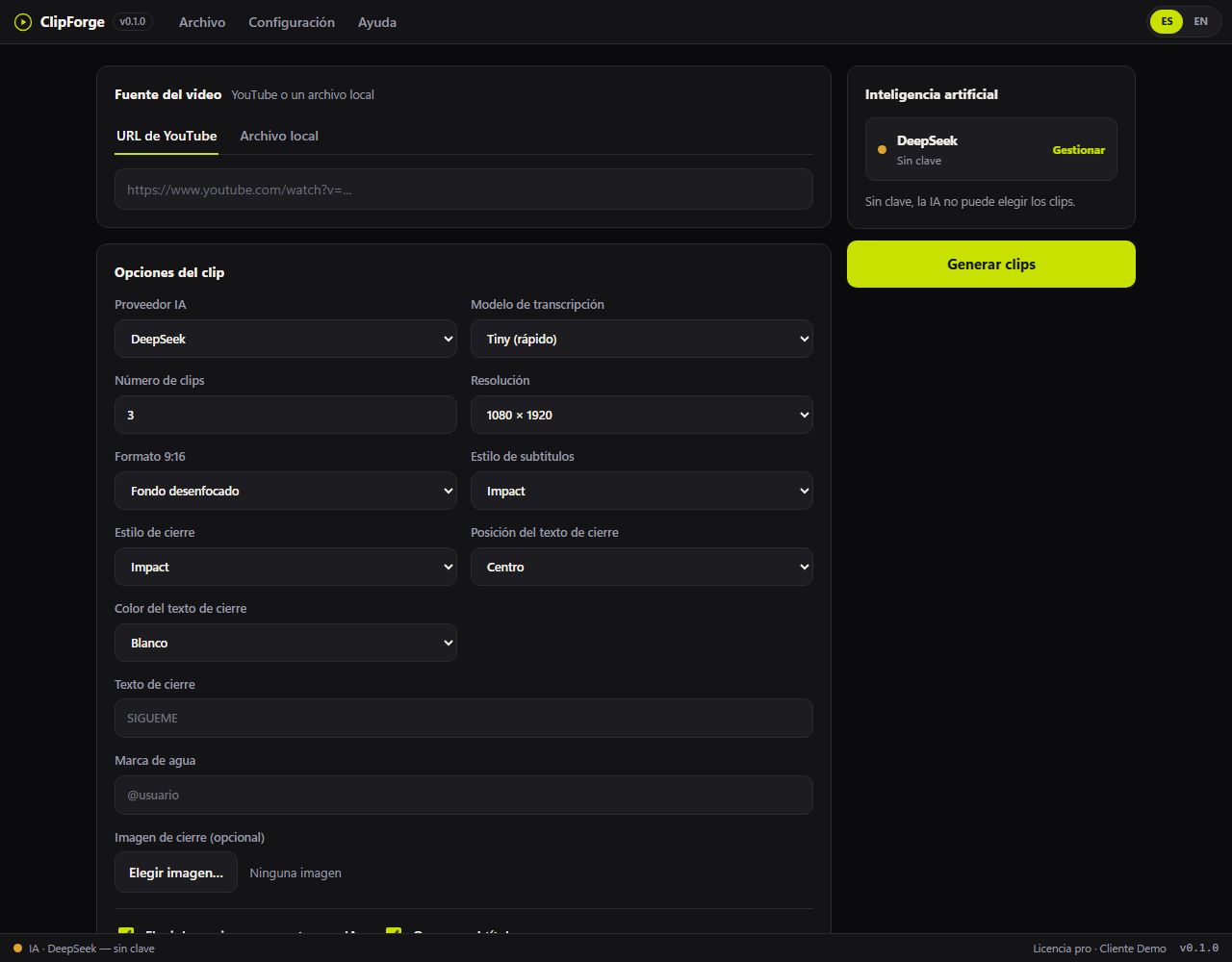
Cutalo is a Windows desktop app that turns long videos into short, vertical, ready-to-post clips. It uses AI to find the best moments, auto-reframes to 9:16, 1:1 or 16:9, removes silence and burns in captions. You bring your own AI API key, so your videos are never uploaded to a cloud editor.
No timeline, no manual cuts, no hand exports. Four steps, about three minutes the first time.
Paste a YouTube link or pick a local file: mp4, mov, mkv or webm.
Choose how many clips, the format and an AI angle, or write your own instructions.
Cutalo reads the transcript and marks the moments with the most hook.
Download clips in 9:16, 1:1 or 16:9 with captions, silence removed and an end card.
DeepSeek, OpenAI or Gemini read the transcript and mark the moments with the most stopping power. Pick an angle like educational, humor, sales or quotes, or write your own prompt.
9:16 for Reels, TikTok and Shorts. 1:1 for the feed. 16:9 for YouTube and LinkedIn. Choose the format and resolution and the composition adapts on its own.
Dead pauses get cut automatically, so the clip keeps the pace people expect. Captions re-sync to the new timeline, so nothing drifts out of place.
Auto-reframe tracks the speaker's face: when they move, the frame moves with them. Built for podcasts, webinars, classes and talking-head videos.
Nothing goes to the cloud. Cutting, transcription and rendering all happen on your computer, so long files and private recordings stay private.
Watermark, end card with your text or logo, accent color and caption style. Set it once and every clip comes out on brand.
Most clippers are cloud subscriptions that charge by upload minutes. Cutalo runs on your machine and you bring your own AI key, so you can pay a flat price once.
| Feature | Cutalo | Typical cloud clipper | Manual editing |
|---|---|---|---|
| Where it runs | On your PC | In the cloud | On your PC |
| Uploads required | None | Yes, every video | None |
| AI cost | Your own key | Bundled credits | None |
| Pricing model | Flat monthly or pay once | Monthly, minutes-based | Your time |
| Vertical auto-reframe | Yes, plus face tracking | Usually | By hand |
| Silence removal | Yes | Sometimes | By hand |
| Pay-once option | Yes, $79 lifetime | Rare | Not applicable |
| Works offline | Yes, with local files | No | Yes |
Comparison reflects publicly listed plans and features as of October 2026. Cloud tools evolve quickly, so check each vendor's site for current details.
Subscribe if you prefer a monthly fee, or pay once and keep it forever. Either way you use your own AI key: no invented credits, no hidden limits.
$0/ always
$4.99/ mo
or $39/year, two months free
$79/ once
One payment, updates included
Pay with card, PayPal or Binance. Your license activates in the app in one click.
Mine VODs and long uploads for the clips that travel, without a second editor.
Turn webinars and podcasts into a daily feed of short teaching clips.
Repurpose product demos and testimonials into Reels and Shorts on a budget.
Batch a month of vertical content from a client's back catalog in one sitting.
Cutalo is a Windows desktop app that turns long videos into short, vertical, ready-to-post clips. It uses AI to find the best moments, auto-reframes to 9:16, 1:1 or 16:9, removes silence and burns in captions. You bring your own AI API key, so your videos are never uploaded to a cloud editor.
Yes. The free trial makes up to two clips per video in 720p with a watermark and no time limit. Pro is $4.99 per month or $39 per year, and a $79 one-time lifetime license is also available.
Yes. Cutalo works with DeepSeek, OpenAI, Gemini, OpenRouter or Groq. You add your own key once and it is stored on your machine. This keeps costs transparent and avoids fake credit systems.
No. Cutting, transcription and rendering all run on your computer. Only your AI key is sent to the provider you choose; the video files stay on your PC.
Six: 1080x1920 and 720x1280 (9:16), 1080x1080 and 720x720 (1:1), and 1920x1080 and 1280x720 (16:9). Silence cut and face tracking work in every one of them.
Yes. Paste a YouTube URL and Cutalo downloads it, transcribes it and generates clips. A local file works too: mp4, mov, mkv or webm.
Yes. The silence cut removes dead pauses and re-syncs the captions to the new timeline. Face tracking keeps the speaker centered in vertical frames, which is built for podcasts, classes and talking-head videos.
Yes. The $79 lifetime license is a one-time payment that includes everything in Pro forever, on up to three machines, with no monthly fee.
After checkout you receive a license key. Paste it into the app once and Cutalo unlocks Pro on that machine. There is nothing else to install.
Not yet. Cutalo is built for Windows 10 and Windows 11, 64-bit. The installer includes everything, so there is no Python or extra setup.
Free to try. The installer is self-contained: no Python, no extra tools. Bring your own AI key and start clipping in minutes.
Trial makes up to 2 clips per video.
Download Cutalo and post today.
Download for Windows